

Advanced Linked Issues & Traceability
Welcome to the Advanced Linked Issues & Traceability documentation. This application extends YouTrack with richer linked-issue tables, inline editing for fields, project-level configuration, and a traceability matrix for cross-scope relationship analysis.
Key Features
- Configurable linked-issue tables: Choose visible columns, visible link types, inline-editable fields, and aggregate-enabled fields
- Two linked-issue layouts: Switch between grouped rows and a flat table, with relation labels visible in flat mode
- Nested linked issues: Expand linked issues up to two levels deep when nested mode is enabled
- Inline editing: Update supported built-in and custom fields directly inside the issue panel
- Aggregate row: Show sum, average, min, max, or median for numeric and period fields
- Project overrides: Keep installation-wide defaults while allowing selected projects to opt into a custom setup
- Traceability matrix: Compare two issue scopes, inspect directional relations, and manage links directly from the matrix
- Saved reports: Save private and shared traceability reports and reopen them with results loaded automatically
- Export support: Export traceability reports to CSV or XLSX
- Localized interface: Use the app in English, Polish, Czech, German, Spanish, French, Hungarian, Italian, Japanese, Korean, Portuguese, Russian, Turkish, Ukrainian, or Chinese
Why Teams Use Advanced Linked Issues & Traceability
- Reduce context switching: Review and edit linked issues without leaving the current issue
- Make dependencies readable: See grouped relations, nested issue trees, and traceability coverage in one product
- Standardize views by project: Roll out one global default and refine it only where local workflows need it
- Audit cross-scope links faster: Compare one issue set to another and find missing, incomplete, or directional relationships
- Save repeatable analysis: Reopen named traceability reports for recurring reviews and delivery checkpoints
Quick Start
- Administrators: Open the Admin Guide to review access status, manage licensing, and define installation defaults.
- Project owners: Use the Project Settings Guide to override the global defaults for selected projects.
- Issue users: Follow the Issue Panel Guide to work with linked issues directly on issue pages.
- Report users: Read the Reporting Guide to build traceability matrices, save reports, and export results.
Product Areas
Global Configuration
The administration page controls:
- trial and subscription lifecycle
- offline activation support
- installation-wide linked-issue defaults
Project Settings
Projects can either inherit the global defaults or store their own linked-issue configuration. This is useful when one team needs a different column set, different link filters, or nested issue expansion.
Issue Panel
The issue panel appears above the activity stream and focuses on day-to-day linked-issue work:
- grouped or flat table view
- column selection
- inline editing
- aggregate row
- nested issue expansion
Traceability Reports
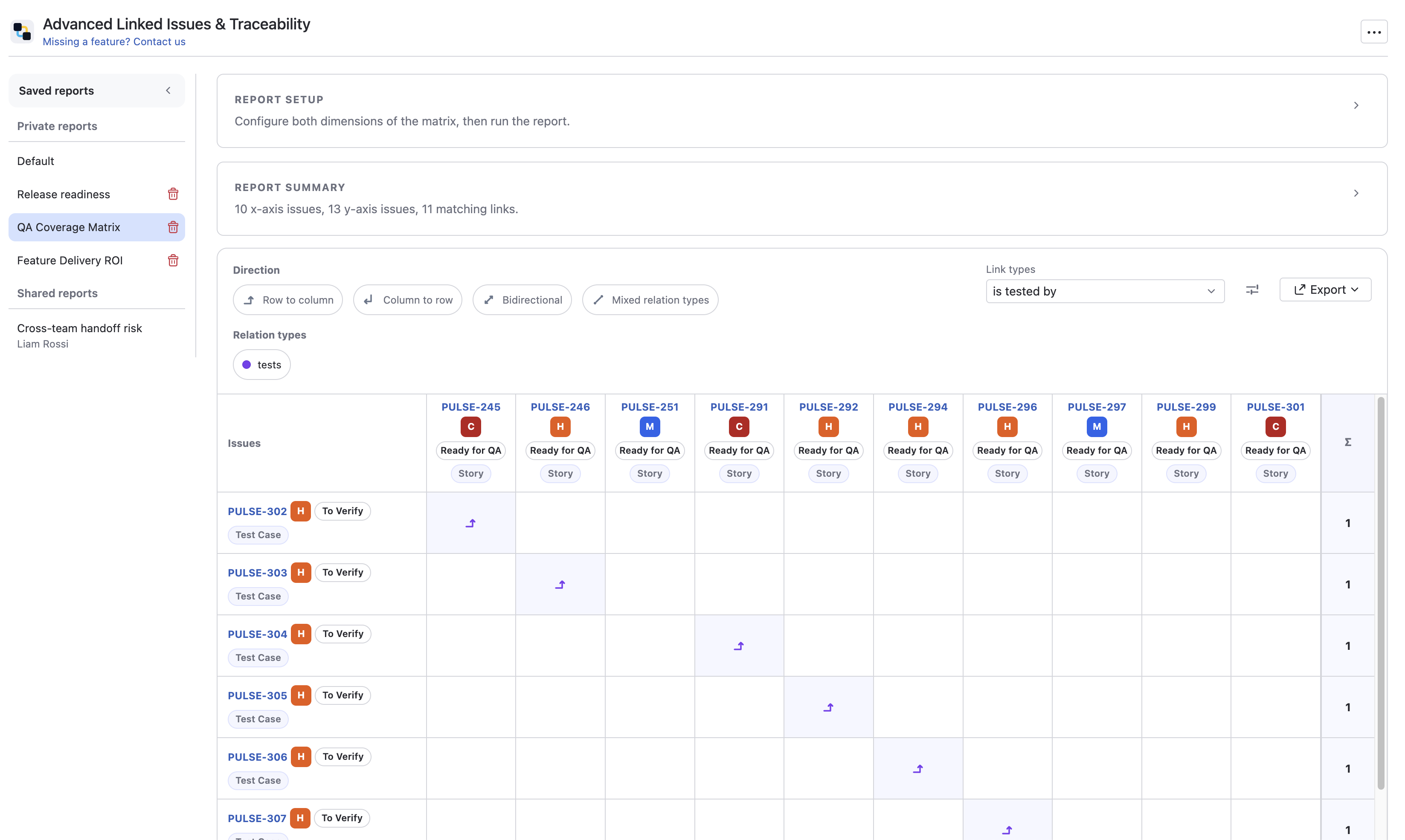
The main menu report lets you compare two scopes such as a project and a saved query, or a reporter and a tag. The result is a directional matrix that shows which issue pairs are connected and lets you add or remove links directly from the grid.
Example Use Cases
Release Readiness Check
Use the traceability matrix to compare delivery issues on one axis with verification issues on the other and quickly see which relationships are still missing.
Dependency Review in a Single Issue
Open the issue panel on a parent issue, expand one of its linked children, and review the next level of linked work without opening multiple tabs.
Project-specific Linked Issue Workspace
Override the global defaults in a project to expose only the fields and link types that matter to that team.
Minimum Requirements
- YouTrack: Advanced Linked Issues & Traceability runs inside YouTrack as an Appfero application
- Compatibility: Check the JetBrains Marketplace vendor page for the latest compatibility information
- Connectivity: Standard subscription validation uses the online lifecycle flow
Offline Access
Offline activation is supported for on-premise and restricted-network installations. Contact support@appfero.com to discuss offline licensing.
Supported Interface Languages
Advanced Linked Issues & Traceability follows the YouTrack app locale when available and falls back to English. The current interface languages are:
- English
- Polish
- Czech
- German
- Spanish
- French
- Hungarian
- Italian
- Japanese
- Korean
- Portuguese
- Russian
- Turkish
- Ukrainian
- Chinese
Need Help? Contact support@appfero.com or use the support form.