

💳 Subscription & Pricing
Planning Poker Estimation offers flexible plans designed to support teams of all sizes—from small teams just getting started to large organizations running Planning Poker across multiple teams.
📊 Pricing Overview
- Pricing Model: Plan-based subscription
- Billing: Monthly subscription
- Free access: Free plan available for evaluation and small teams
- Paid plans: Activate immediately after purchase
- Payment: Secure checkout powered by Paddle
- Upgrades: All upgrades are done directly from within the YouTrack app
Advanced collaboration features
Editing issue descriptions, reading and adding issue comments, and enabling Edit votes after reveal are available on Pro and Enterprise plans.
💰 Pricing Plans
Who is a moderator?
A moderator is a team member who can:
- Create new Planning Poker sessions
- Manage session settings (add/remove issues, configure decks, set timers)
- Reveal cards and save final estimates
- Control session flow (start over, finish session)
Estimators and spectators can participate in unlimited sessions, however, there is a limit on unique estimators per month based on your selected plan.
Free Plan
Perfect for small teams starting with Planning Poker.
Included:
- ✅ All users are treated as moderators (limited features)
- ✅ Standard estimation sessions
- ✅ Limited monthly usage for evaluation
- ✅ Public estimation sessions
- ✅ Limited backlog size
- ✅ Limited estimator capacity
- ✅ All 5 card decks available
- ✅ Basic features
Best for:
- Occasional estimation needs
- Small evaluation teams
- Testing Planning Poker workflow
Starter Plan
Perfect for small teams starting with Planning Poker.
Included:
- ✅ Up to 2 moderators
- ✅ Up to 20 unique estimators per month
- ✅ Private/public sessions
- ✅ Unlimited estimation sessions
- ✅ All session decks
- ✅ Real-time sync across participants
- ✅ Unlimited backlog size
- ✅ Estimation timers
- ✅ Save to Integer, Float, Period, or Enum fields
- ✅ 16 languages supported
Best for:
- Single Scrum teams
- Teams with up to 2 Scrum Masters
Pro Plan ⭐ Best Value
Everything you need for efficient team estimations across multiple squads.
Included:
- ✅ Up to 5 moderators
- ✅ Up to 50 unique estimators per month
- ✅ Everything in Starter
- ✅ Priority support
Best for:
- Organizations with multiple Scrum teams
- Parallel estimation sessions
Enterprise Plan
Tailored solutions for large-scale organizations.
Included:
- ✅ Up to 15 moderators
- ✅ Up to 150 unique estimators per month
- ✅ Everything in Pro
- ✅ Dedicated support channel
- ✅ Manual licensing for air-gapped instances
Best for:
- Large-scale organizations
- Security-restricted environments
- Company-wide Planning Poker usage
📅 Billing Options
We offer two flexible billing options for all paid plans:
- Monthly Billing: Pay as you go with monthly flexibility.
- Annual Billing: Get 2 months free (16% discount) by paying for the full year upfront.
🆓 Free Plan Instead of Trial
Planning Poker Estimation does not use a separate trial for paid plans. The Free plan is available after installation so teams can try the workflow at low volume.
Paid plans activate immediately after purchase and billing starts from the beginning of the subscription.
🛒 Getting Started
1. Install the Application
- Visit JetBrains Marketplace
- Enter your YouTrack instance URL and click Install
- Or install from YouTrack: Administration → Apps → Add app... → Browse Marketplace
- The application starts in Free mode
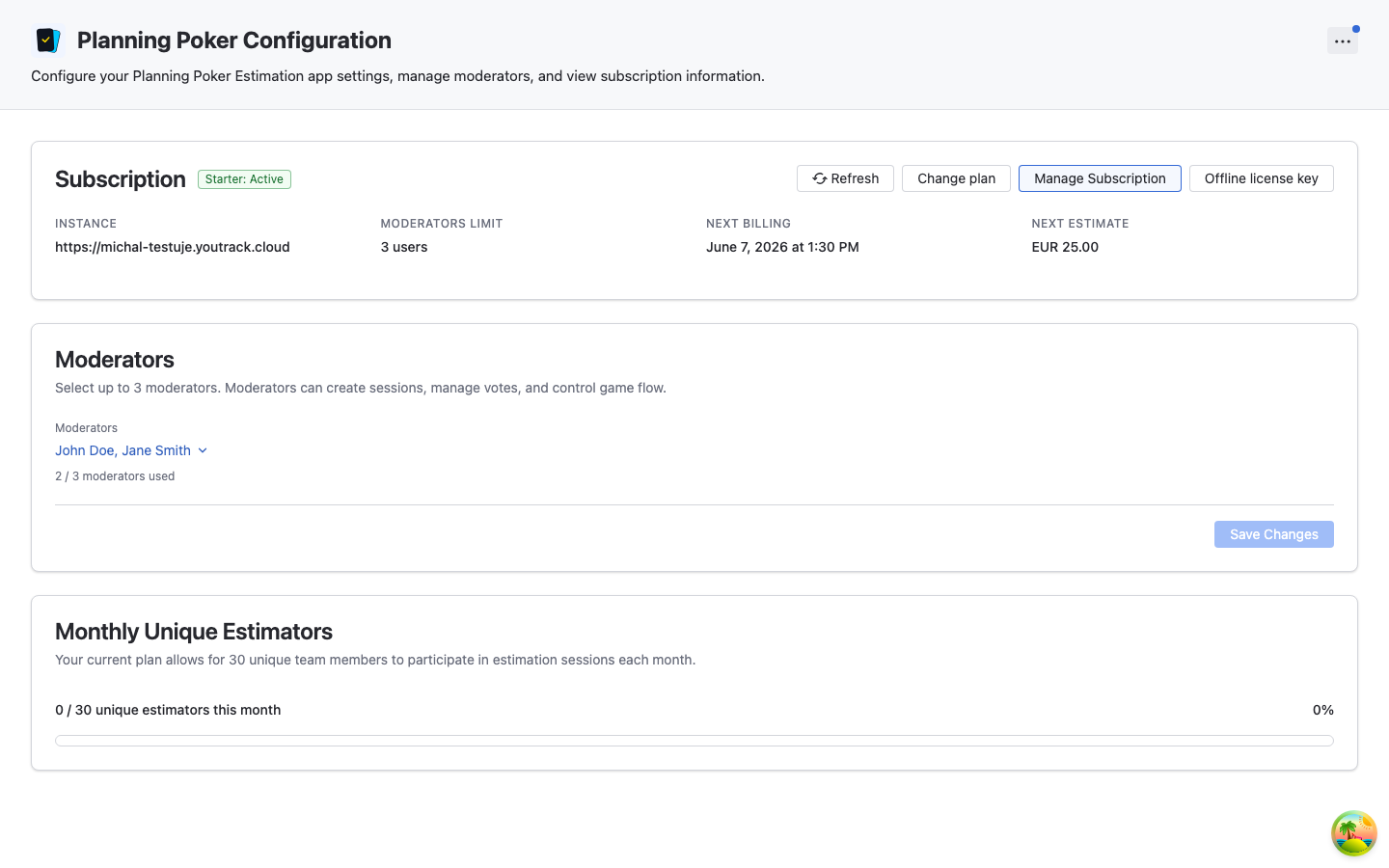
2. Upgrade to a Paid Plan
To unlock full features, upgrade directly from within the app:
- Go to Administration → Integrations → Planning Poker Settings
- Click "Buy now" button in the admin panel
- You'll be redirected to secure checkout
- Choose your plan (Starter, Pro, or Enterprise)
- Select Monthly or Annual billing
- Enter payment information and complete purchase
- Return to YouTrack and click "Refresh" in the admin panel
- Your paid subscription activates automatically
Upgrade from Within the App
All subscription purchases and upgrades are done directly from within the YouTrack application. Simply navigate to the Planning Poker admin panel and click the "Buy now" button.
3. Manage Your Subscription
- View Status: Check subscription details in the admin panel
- Update Payment: Manage payment methods via the Paddle customer portal
- Change Plans: Upgrade or downgrade anytime—changes take effect immediately
- Cancel Anytime: Access continues until the end of your billing period
Changing Plans
You can change your plan from the admin panel. Plan changes take effect according to the current subscription flow.
🔒 Payment & Security
We use Paddle as our payment processor. All card information is processed directly by Paddle, which is PCI-DSS SAQ A compliant, ensuring secure handling of payment data.
❓ Frequently Asked Questions
How is billing calculated?
Billing is plan-based. You choose a plan that matches your team's needs based on the number of moderators and unique monthly estimators you require.
What is the unique estimator limit?
To ensure fair usage, paid plans include a limit on unique monthly estimators (users who participate in estimation sessions). This limit is calculated as Moderator Limit × 10. For example, the Starter plan (2 moderators) allows for 20 unique estimators per month.
You can track your usage in the Administration panel.
What happens if I need more moderators?
You can upgrade your plan anytime directly from the app. If you exceed your moderator limit, you'll see a banner prompting you to upgrade. The upgrade takes effect immediately.
What happens if I downgrade my plan?
If you downgrade to a plan with fewer moderators, the app automatically reduces the number of moderators to the new limit.
Do you offer annual billing?
Yes! We offer annual billing with a 16% discount (you pay for 10 months and get 12 months of service). You can toggle between monthly and annual billing during the checkout process.
What if I need offline access?
The Enterprise plan supports offline and air-gapped installations with manual licensing.
- Contact Support: Reach out to discuss your requirements.
- Receive Token: We will provide a signed offline license token.
- Activate: Paste the token into the Offline Activation dialog in your YouTrack instance.
See the Administration Guide for detailed steps.
How do I cancel?
You can cancel your subscription in the Paddle customer portal (accessible from the admin panel via "Manage Subscription"). Your access continues until the end of the current billing period, then you'll automatically switch to the Free plan.
How do I upgrade my plan?
All upgrades are done directly from within the YouTrack application. Navigate to Administration → Integrations → Planning Poker Settings and click the "Buy now" or "Change plan" button. You'll be guided through the process.
Need Help? Contact support@appfero.com for subscription questions or custom licensing needs.