

Administration Guide
This guide helps YouTrack administrators install, configure, and manage the Planning Poker Estimation application.
📦 Installation
Installing from JetBrains Marketplace
- Visit Planning Poker Estimation on JetBrains Marketplace
- Enter your YouTrack instance URL
- Click "Install to YouTrack"
- Confirm installation in YouTrack
Installing from YouTrack
- Navigate to Administration → Apps
- Click "Add app..." → "Browse JetBrains Marketplace"
- Search for "Planning Poker Estimation"
- Click "Install"
- Confirm installation
Post-Installation
After installation:
- The application is immediately available to all users from the main menu
- The application runs in free mode with limited features
- Navigate to Administration → Integrations → Planning Poker Settings to configure your subscription
First Steps
After installation, we recommend:
- Reviewing subscription settings
- Creating a test session to familiarize yourself with the interface
- Sharing the Moderator Guide and Estimator Guide with your team
⚙️ Configuration
Admin Panel Overview
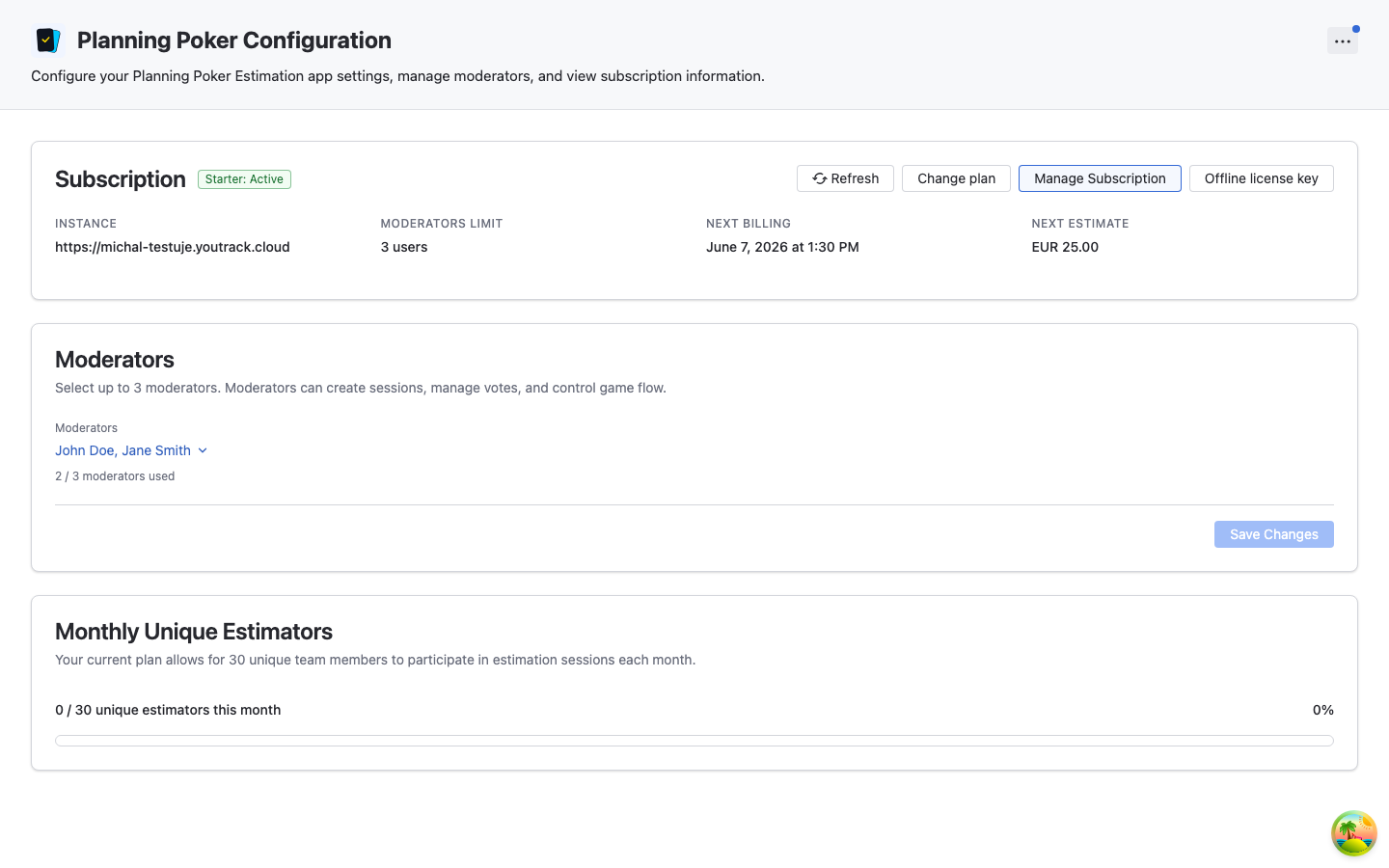
The admin panel provides:
- Subscription Management: View and manage your subscription
- Moderator Management: View and manage your moderators
- Estimator Usage: Track your monthly unique estimator usage
💳 Subscription Management
Subscription Panel
The Subscription Panel displays:
- Current Plan: Starter, Pro, or Enterprise
- Status: Active or Expired
- Moderator Limit: Maximum number of moderators for your plan
- Estimator Usage: Current month's unique estimator count vs. your plan's limit
- Next Billing Date: When your subscription renews (paid plans only)
- Instance ID: Your YouTrack instance identifier
Upgrading Your Plan
To upgrade from Free to a paid plan:
- Click "Buy now" in the admin panel
- You'll be redirected to secure checkout on appfero.com
- Choose your plan
- Enter payment information and complete purchase
- Return to YouTrack and click "Refresh" in the admin panel — subscription activates automatically
Changing Plans
You can upgrade or downgrade your plan anytime:
- Click "Change Plan" in the admin panel
- Select a different plan
- New limits apply immediately
Managing Your Subscription
- Click "Manage Subscription" in the admin panel
- You'll be redirected to the Paddle customer portal where you can:
- Update payment information
- Cancel your subscription
- View your subscription history
- Changes are saved automatically
Manual License Refresh
If your subscription status isn't updating automatically:
- Click "Refresh" in the admin panel
- The application will re-validate your subscription
- Status updates within a few seconds
When to Use:
- After purchasing or upgrading
- If status shows incorrect information
- After payment method updates
🔑 Offline Activation
For YouTrack instances with restricted or no internet access (air-gapped), Planning Poker Estimation supports manual license activation using signed tokens. This feature is available for Enterprise customers.
How to Activate Offline
- Obtain License Token: Contact support@appfero.com to receive your signed license token.
- Open Admin Panel: Navigate to Administration → Integrations → Planning Poker Settings.
- Trigger Activation: Click the "Offline license key" button in the subscription panel.
- Paste Token: Paste the provided token into the dialog and click "Activate".
- Verify Status: The subscription status will update immediately to reflect the license contained in the token.
👥 User Management
For detailed information about managing users, roles, and permissions, see the dedicated User Management guide.
Quick overview:
- Moderators: Create and manage sessions (count toward subscription limits)
- Estimators: Participate in voting (count toward subscription limits)
- Spectators: Observe sessions without voting
See User Management for complete details on assigning moderators and managing permissions.
🔧 Troubleshooting
Subscription Not Activating
Symptoms:
- Purchased subscription but status shows "Trial" or "Free"
- License status shows "Invalid"
Solutions:
- Click "Refresh License" in the admin panel
- Wait a few minutes and refresh again
- Check internet connectivity
- Verify payment was processed in Paddle portal
- Contact support@appfero.com with transaction details
Can't Save Estimates
Symptoms:
- "Save Estimate" button doesn't work
- Error message when saving
Solutions:
- Verify field exists in YouTrack
- Check user has
UPDATE_ISSUEpermission - Ensure provided value matches field type
- Ensure field is configured in issue for editing
🔄 Updates & Maintenance
Updating the Application
Planning Poker Estimation updates are delivered through the JetBrains Marketplace:
- Navigate to Administration → Apps
- Find Planning Poker Estimation
- If an update is available, click "Update"
Update Notifications
The app shows update notifications in more options menu (blue dotted when there is an update available):
- What's New: Click on more options menu and select "What's New" to view recent release announcements
- Update available: Click on more options menu and select "Update" to update the app
Data Preservation
During Updates:
- ✅ All session data is preserved
- ✅ Configuration settings are maintained
- ✅ Subscription status is retained
- ✅ User preferences are saved
During Uninstallation:
- ✅ Subscription status is retained
- ❌ All app data is permanently deleted
- ❌ Sessions are removed
- ❌ No recovery possible
Uninstallation Warning
Uninstalling the application permanently deletes all data. This does not apply to updates—only complete uninstallation. Use with extreme caution.
📋 Security Considerations
- Permissions: Grant only necessary permissions to users
- Private Sessions: Use private sessions for sensitive planning
- Data Privacy: All estimation data stays in your YouTrack instance
- Subscription Management: The application connects to Appfero only as needed to manage your subscription
- Subscription Security: Manage subscription through secure Paddle portal
💬 Support & Contact
Getting Help
- Documentation: Browse our comprehensive guides
- Email Support: support@appfero.com
- Response Time: We typically respond within 24 hours (business days)
Enterprise Support
Enterprise plan customers receive:
- Priority Support: Faster response times
- Custom Licensing: Possibility to purchase manual licenses for offline installations
- Implementation Assistance: Help with rollout
Contact support@appfero.com to discuss Enterprise support options.
Reporting Issues
When reporting issues, please include:
- YouTrack Version: Your YouTrack version number
- Application Version: Planning Poker Estimation version
- Subscription Plan: Your current plan (Free, Standard, Advanced, Enterprise)
- Description: Detailed description of the issue
- Steps to Reproduce: How to recreate the issue
- Screenshots: Visual evidence of the problem (if applicable)
Feature Requests
We welcome feature requests! Email support@appfero.com with:
- Description: What feature you'd like to see
- Use Case: Why this feature would be valuable
- Priority: How important this is to your team
We prioritize features based on user demand and feasibility.
Need More Help? Contact support@appfero.com or visit our FAQ page.