

Estimator Guide
This guide helps team members participate effectively in Planning Poker estimation sessions as estimators.
👥 What is an Estimator?
An estimator is a team member who:
- Participates in estimation sessions
- Votes on issue complexity by selecting cards
- Views revealed estimates and participates in consensus discussions
Estimators are the core participants in Planning Poker sessions—they're the ones doing the actual estimation work!
🚀 Getting Started
Joining a Session
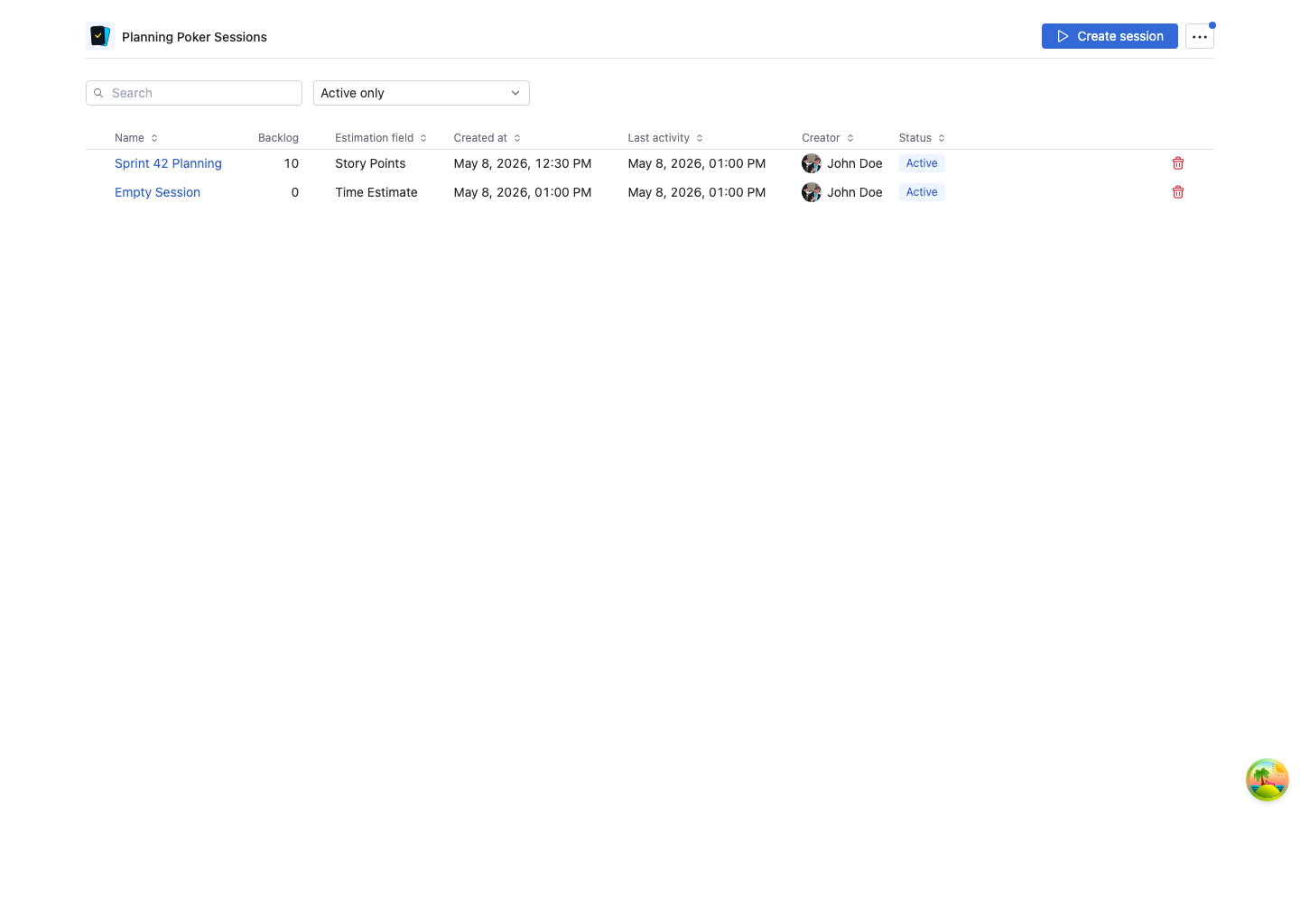
- Navigate to Planning Poker in the YouTrack main menu
- You'll see a list of active sessions
- Click on a session to join (if you're invited as an estimator)
Joining from an Invitation Link
On YouTrack 2026.1.12024 or later, Planning Poker Estimation supports direct session links. When a moderator or teammate sends you a Planning Poker invitation link:
- Open the link while signed in to YouTrack
- The Planning Poker app opens directly on the invited session
- If you are not allowed to access the session, the app shows that the session is unavailable to your account
You may also see an invitation alert in the Planning Poker app when you are assigned to an active session. Click Open session in the alert to join.
::: note Older YouTrack Versions Direct session links and invitation alerts require the YouTrack app navigation API introduced in build 2026.1.12024. On older YouTrack versions, join sessions from the Planning Poker session list instead. :::
Private Sessions
If a session is marked as private, you'll only see it if you're explicitly invited as a moderator, estimator, or spectator.
Understanding the Session Interface
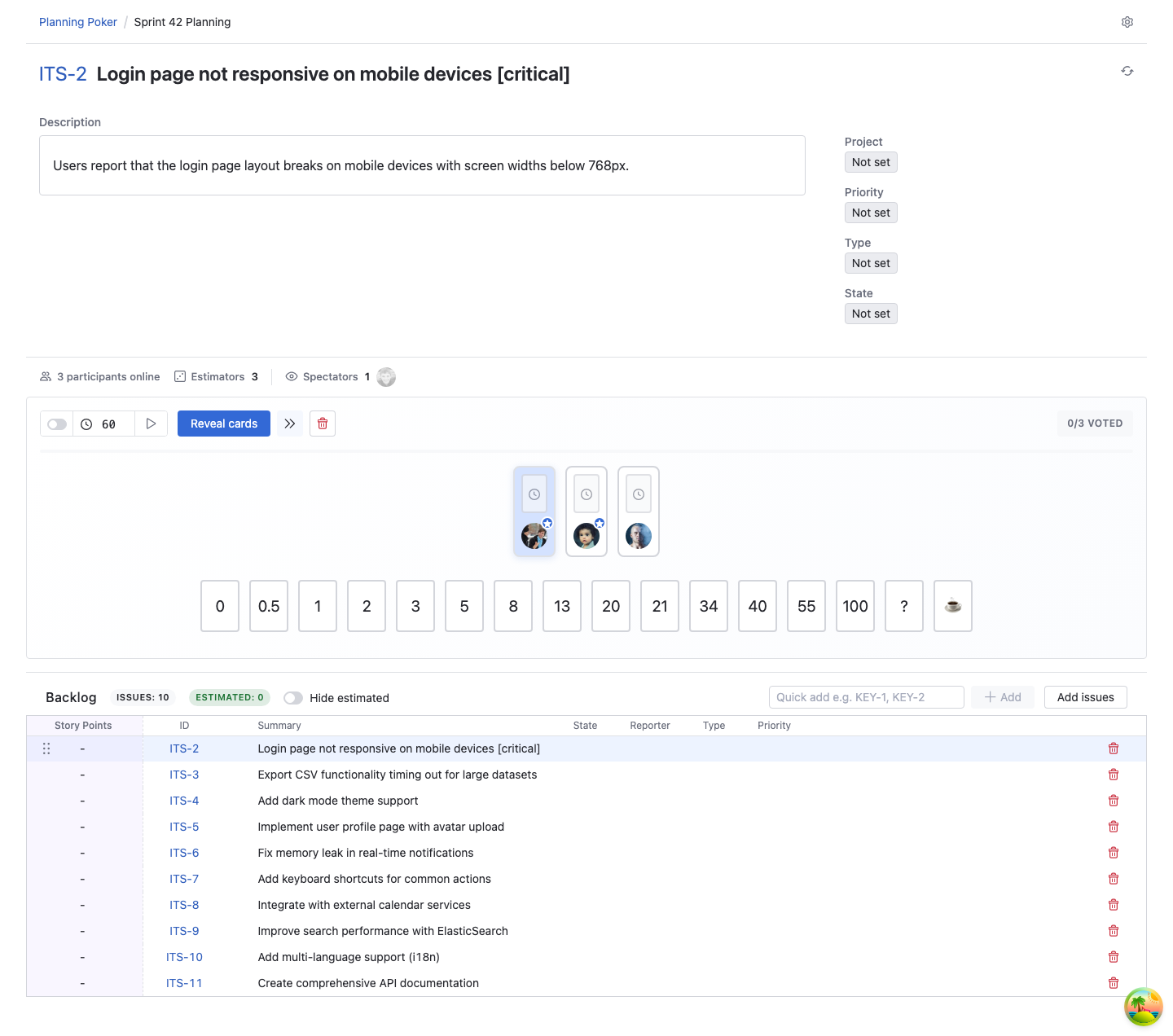
When you join a session, you'll see:
- Issue Details: Current issue being estimated with link, summary, description and some other fields
- Estimation Cards: Available cards from the selected deck
- Participant Status: Who's online and who has voted
- Timer (if enabled): Countdown for the current issue
- Session Backlog: List of issues to be estimated
🎯 Participating in Estimation
The Estimation Process
Planning Poker follows a simple flow for each issue:
- Discussion: Team discusses the issue (moderator may start a timer)
- Vote: Each estimator selects a card representing their estimate
- Wait: Cards remain hidden until everyone has voted
- Reveal: Moderator reveals all cards simultaneously
- Consensus: Team discusses differences and reaches agreement
- Save: Moderator saves the final estimate to YouTrack
Selecting Your Estimate
- Review the Issue: Read the issue description
- Consider Complexity: Think about technical complexity, unknowns, dependencies, and risks
- Select a Card: Click on the card that represents your estimate
- Wait for Reveal: Your card is hidden from other participants until reveal
Independent Thinking
Your card selection is completely private until the moderator reveals all cards. This prevents anchoring and ensures everyone thinks independently.
Changing Your Vote
You can change your vote before cards are revealed:
- Click on a different card
- Your previous selection is replaced
- Other participants won't know you changed your vote
After Reveal
By default, once cards are revealed, you cannot change your vote. In Pro and Enterprise sessions where the moderator enables Edit votes after reveal, you can update your card after reveal without restarting the round.
Special Cards
- ? (Question Mark): "I don't understand the requirement" or "I need more information"
- ☕ (Coffee): "I need a break" or "This discussion is taking too long"
Using Special Cards
Don't hesitate to use ? when you're unclear about requirements. It signals to the team that more discussion is needed before estimation.
💬 Participating in Discussions
Before Voting
- Ask Questions: Clarify requirements, acceptance criteria, or technical approach
- Share Concerns: Mention potential risks, dependencies, or unknowns
- Listen Actively: Understand different perspectives from team members
After Reveal
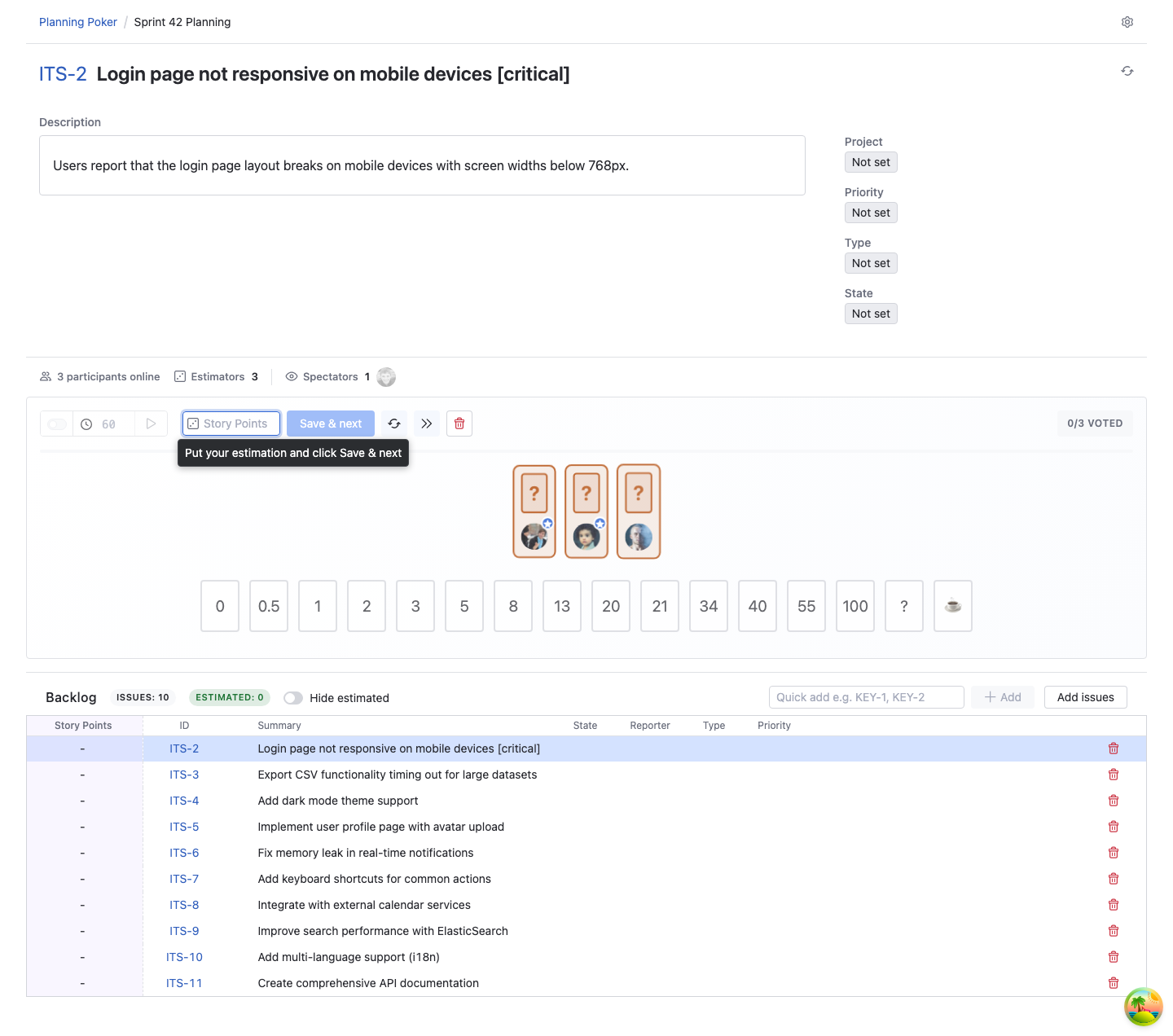
When cards are revealed, you'll see everyone's estimates:
If Estimates Align
- Quick Consensus: If most estimates are similar, the team can quickly agree on a value
- Moderator Saves: The moderator selects the consensus value and saves it to YouTrack
If Estimates Diverge
- Discussion Time: Team members with the highest and lowest estimates explain their reasoning
- Share Insights: Discuss technical approaches, risks, or assumptions
- Re-estimate: After discussion, the moderator may ask the team to vote again
Divergent Estimates Are Valuable
When estimates vary widely, it often reveals important information about the task. The discussion that follows is where the real value of Planning Poker emerges!
🎨 Session Features
Viewing Issue Details
During estimation, you can:
- Read Full Description: View complete issue description with formatting
- See Images: View images embedded in issue descriptions
- Check Metadata: See issue type, priority, state and project
- Advanced & Enterprise: View issue comments directly in the session and add new comments when needed
Monitoring Voting Progress
The session interface shows:
- Who Has Voted: Checkmarks or indicators next to participants who have voted
- Who's Still Thinking: Participants who haven't voted yet
- Who's Online: Real-time presence indicators
This helps you know when everyone is ready for the reveal.
Using the Timer
If the moderator enables a timer:
- Countdown Display: See time remaining for discussion/voting
- No Forced Action: Timer expiration automatically reveals cards
- Moderator Control: Only the moderator can start or reset the timer
📊 Understanding Estimation Fields
Depending on the session configuration, estimates may be saved to different field types:
Integer
- Whole numbers only (1, 2, 3, 5, 8, 13, etc.)
Float
- Whole or decimal estimates (0.5, 1.5, 2.5, etc.)
Period
- Time-based estimates (hours, days, weeks)
- Supports format like "1h", "2d", "3w"
Enum
- Custom estimation scales (e.g. XS, S, M, L, XL)
- Enum options can be used as estimation cards
The moderator selects the field type when creating the session.
🎯 Best Practices
Before Estimation
- Review Issues in Advance: If possible, review the backlog before the session
- Understand Acceptance Criteria: Know what "done" means for each issue
- Consider Dependencies: Think about how issues relate to each other
During Estimation
- Think Independently: Don't wait to see what others think—form your own opinion
- Use Relative Sizing: Compare issues to previously estimated work
- Consider All Factors: Think about complexity, risk, unknowns, and dependencies
- Don't Overthink: Planning Poker is about rough estimates, not precise predictions
During Discussion
- Explain Your Reasoning: If your estimate differs significantly, share why
- Listen to Others: Different perspectives often reveal important insights
- Focus on Consensus: The goal is agreement, not being "right"
- Keep It Moving: Don't get stuck in analysis paralysis
Common Pitfalls to Avoid
❌ Anchoring: Don't let others' estimates influence yours before you vote ❌ Sandbagging: Don't inflate estimates to create buffer time ❌ Optimism Bias: Don't underestimate complexity because you want it to be simple ❌ Analysis Paralysis: Don't spend 20 minutes discussing a 2-point story
🔧 Troubleshooting
Can't See a Session
Possible causes:
- Session is private and you're not invited
- Session has been finished
Solutions:
- Ask the moderator to add you as an estimator
- Check if the session is still active
Can't Vote
Possible causes:
- You're assigned as a spectator, not an estimator
- Cards have already been revealed
- Session has been finished
Solutions:
- Ask the moderator to change your role to estimator
- Wait for the moderator to start over if cards are revealed
- Join a different active session
💡 Tips for Effective Estimation
Use Reference Stories
Compare new issues to previously estimated work:
- "This is similar to issue XYZ, which we estimated as 5 points"
- "This is twice as complex as issue ABC, so I'm thinking 8 instead of 4"
Focus on Complexity, Not Time
Estimate relative complexity, not absolute time:
- ✅ "This is more complex than that"
- ❌ "This will take 3 days"
Embrace Uncertainty
It's okay to use ? when you're unsure:
- "I don't understand the requirement"
- "I need more technical details"
- "This depends on decisions we haven't made yet"
Learn from Divergence
When estimates vary widely, it's an opportunity to learn:
- Listen to why others estimated differently
- Share assumptions that influenced your estimate
- Adjust your mental model based on new information
Use Description and Comments as Shared Context
In Advanced and Enterprise sessions, the team can refine the issue directly during estimation:
- Update the description when scope becomes clearer
- Review previous issue comments for additional context
- Add comments to capture decisions made during the discussion
Need Help? Contact support@appfero.com or visit our FAQ page.